817-803-8090

What are the Best Practices When Using an iTero Element 5D?


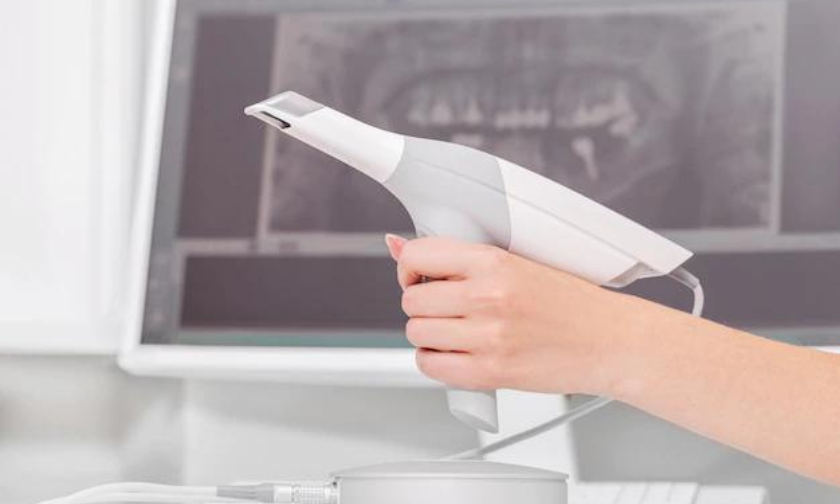
Introduction to the iTero Element 5D
When using an iTero Element 5D, it is important to keep the following best practices in mind:
1. Always use a new, sterile probe tip when scanning. This will help to prevent cross contamination and ensure accurate results.
2. Be sure to properly clean and disinfect the scanner according to the manufacturer’s instructions. This will help to maintain the quality of the images and prevent the spread of infection.
3. Follow the recommended scanning protocols for each indication. This will help to ensure that all necessary information is captured and that the scan is of high enough quality for diagnosis or treatment planning.
4. Keep in mind that iTero Element 5D scans can be used for more than just dental applications. They can also be used for medical indications such as ENT, cardiology, and more. Make sure you are familiar with all of the potential uses of the scanner before using it on patients.
Preparing the iTero Element 5D for Use
When preparing the iTero Element 5D for use, it is important to follow best practices in order to ensure optimal results. Below are some tips to keep in mind when using this digital scanner:
1. Always start with a clean slate – wipe down the scanner and all of its accessories with a clean, damp cloth before each use. This will remove any dirt or debris that could potentially interfere with scanning.
2. Calibrate the scanner according to the manufacturer’s instructions – this step is crucial in ensuring accurate scans.
3. Be sure to position the patient’s head correctly in order to avoid any scanning issues – refer to the user manual for guidance on proper head positioning.
4. Take your time while scanning – rushing through the process can result in subpar scans that may not be usable.
5. If possible, have another person present during scanning – they can help with positioning the patient’s head and keeping them still during scanning.
Following these simple tips will help you get the most out of your iTero Element 5D scanner and produce high-quality scans every time.
Scanning and Imaging with the iTero Element 5D
When it comes to scanning and imaging with the iTero Element 5D, there are a few best practices to keep in mind. First, be sure to calibrate the scanner before each use. This will help ensure accuracy and consistency. Second, when scanning a patient, be sure to scan the entire mouth – not just isolated teeth or areas. This will provide a more complete picture and allow for more accurate diagnosis and treatment planning. Finally, be sure to save all scans and images in a secure location for future reference.
Post-Scanning Practices with the iTero Element 5D
After you’ve scanned your patient’s teeth with the iTero Element 5D, there are a few post-scanning practices you should follow to ensure accurate results. First, be sure to check the scan for any areas that may have been missed or scanned poorly. This can be done by looking at the 3D model on the screen or by using the “Cross Section” tool. If you see any areas that need to be rescanned, simply place the scanner tip over those areas and rescan.
Once you’re satisfied with the scan, you’ll need to export it. This can be done by clicking on the “Export” button in the upper right-hand corner of the screen. From there, you can choose to export as a .stl file or as an .obj file. We recommend exporting as an .obj file, as this will preserve the color information from your scan.
Finally, once your file has been exported, you can view it in any 3D modeling software. We recommend using MeshLab, as it is free and easy to use. Simply open MeshLab and import your .obj file. From there, you can rotate and zoom in on your model to get a better look at it. And that’s it! You’re now ready to begin using your iTero Element 5D scans for diagnosis and treatment planning.
Troubleshooting Common Issues with the iTero Element 5D
If you’re having trouble with your iTero Element 5D, there are a few common issues that you can troubleshoot. First, make sure that the scanner is properly calibrated. If the scanner isn’t calibrated, the images it captures won’t be accurate. You can calibrate the scanner by following the instructions in the user manual.
If you’re still having trouble with the scanner, try restarting it. Sometimes all it takes is a restart to fix the issue.
If you’re still having trouble after restarting the scanner, try unplugging and replugging in the power cord. This will reset the connection between the scanner and your computer.
Finally, if you’re still having trouble, contact customer support for assistance.
Best Practices for Maintenance of an iTero Element 5D
When it comes to maintaining your iTero Element 5D, there are a few best practices you should follow in order to keep it running smoothly. First and foremost, be sure to keep the scanner clean at all times. This means dusting it off regularly and wiping down the surface with a damp cloth. Secondly, make sure to calibrate the scanner regularly. This will ensure that the images it produces are accurate and of high quality. Finally, always update the software on the scanner when prompted by the manufacturer. This will ensure that you have the latest features and bug fixes. By following these simple best practices, you can ensure that your iTero Element 5D will provide years of trouble-free operation.
Conclusion
The iTero Element 5D can be a great tool for dental offices, but it is important to ensure that you are using the device properly and safely. By following the best practices outlined in this article, you should be able to make sure your office is getting the most out of this advanced technology. With regular cleaning, maintenance, and calibration checks, the iTero Element 5D can help you provide the best care possible for your patients.
FAQ’s
When using an iTero Element D scanner, it is important to follow best practices in order to get accurate results. Here are some frequently asked questions about using this type of scanner:
Q: What is the best way to position patients for scanning?
A: Patients should be positioned in the scanner so that their teeth are level with the scan window. They should also be seated comfortably with their head and neck supported.
Q: How long does a scan take?
A: A typical scan takes about 2 minutes.
Q: How should I move the scanner during a scan?
A: During a scan, the iTero Element D scanner should be moved slowly and smoothly in an up-and-down motion to ensure accurate results. Avoid jerking or shaking the scanner as this can affect accuracy.